← All work
Independent product Live

A live, configurable poster-personalization SaaS

Netakit turns a saved user profile into event-ready social graphics through calendar-driven templates, deterministic compositing, asynchronous rendering, and internal layout tooling.

Netakit — Dashboard
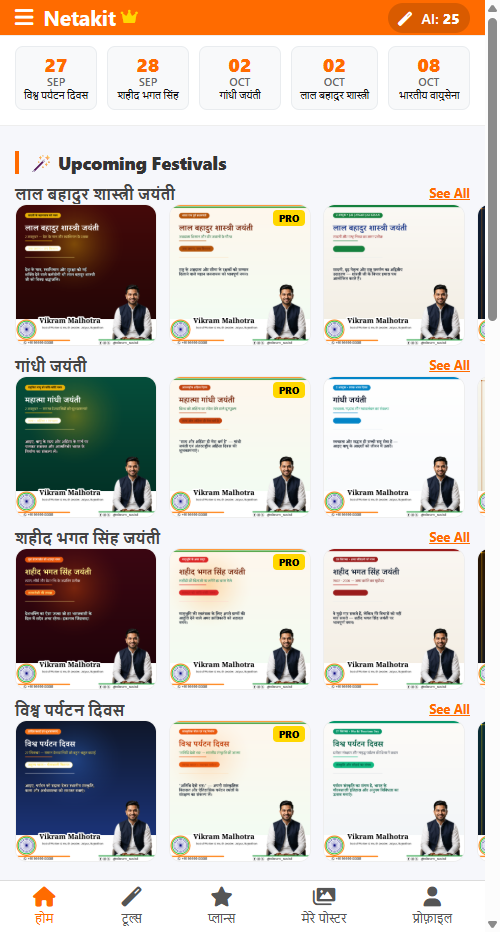
Netakit mobile dashboard showing active upcoming event calendar strip and populated festival carousels with tiered PRO badges

Synthetic demo profile and data shown. The dashboard surfaces upcoming events and personalized poster options from the saved user profile.

The problem and product goal

For public representatives, party workers, and community organizers in India, social posts often need to be updated around festivals, national observances, remembrance days, and local events.

Creating each poster manually means repeating the same identity work — portrait, name, designation, organization or party symbol, and contact details — across every design. General-purpose design tools can still require those elements to be placed and checked each time.

Netakit separates saved identity data from template artwork. Users set up their profile once, browse relevant upcoming events, choose a design, and generate a personalized high-resolution poster from that same saved profile.

The core product workflow

The product architecture separates user identity from template artwork, enabling repeated personalization across templates:

01

Profile Once

Save portrait, name, designation, contact details, and organization/party symbol

02

Event Discovery

See templates linked to relevant upcoming calendar events

03

Choose Variant

Choose from the available poster designs for that event

04

Personalize

Preview profile placement and edit the slogan or caption

05

Async Render

Redis/RQ worker creates the 1080×1080 composite with Pillow

06

Download

Download the finished high-resolution PNG

Calendar-driven event discovery

Timing matters in event-based social publishing: a poster is most useful when the relevant date is approaching. Netakit stores upcoming events separately from the artwork and uses that calendar metadata to surface matching template groups on the dashboard.

Active near-term events appear as dashboard rows with personalized preview cards already generated from the user’s saved profile. In the synthetic demo shown here, the dashboard includes upcoming observances such as Shaheed Bhagat Singh Jayanti, Gandhi Jayanti, and Indian Air Force Day.

Because event dates, captions, artwork, and layout rules are managed through the content tools, new calendar content can be added without changing the core user workflow.

Personalization workflow and final composite output

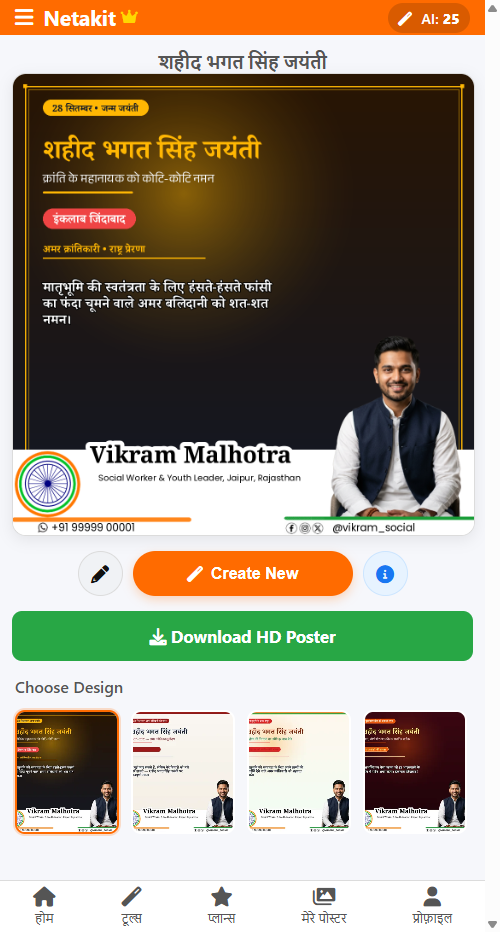
Inside the personalization view, users can compare design variants, preview their saved identity on the artwork, and edit the slogan or caption before generating the final asset.

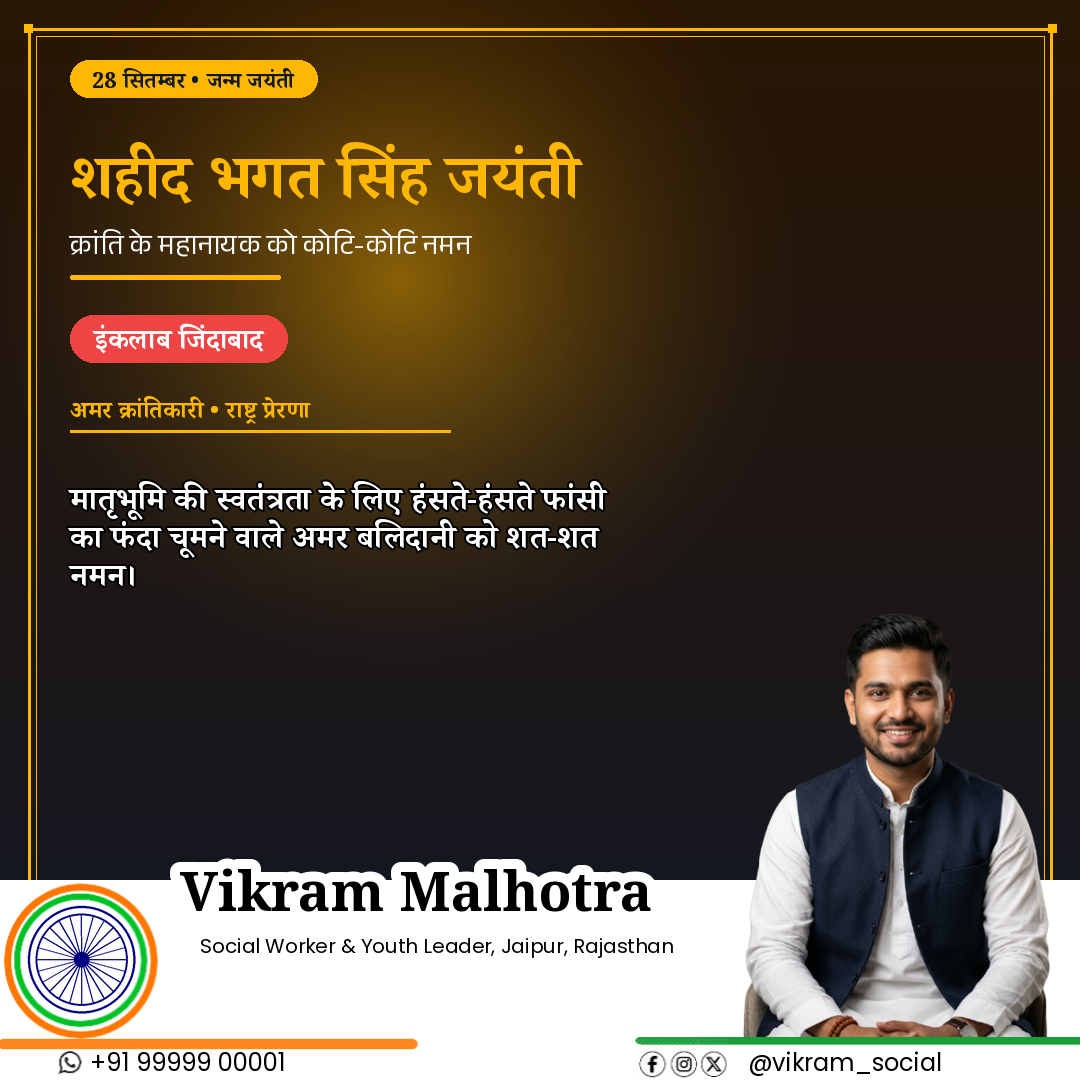
Poster composition itself is deterministic. Profile images, typography, symbols, and footer details are placed using configured layout rules; AI is used separately for optional slogan assistance. The layout rules help keep identity elements readable and consistently positioned across generated posters.

Netakit — Personalization
Netakit mobile personalization workflow showing design variant thumbnails, live slogan customizer, and download action
Netakit — Generated Poster
Netakit generated 1080×1080 poster showing Hindi typography, synthetic profile portrait, symbol, and contact footer

Synthetic demo profile and data shown. Left: Mobile workflow view where users select design variants, preview personalized layouts, and trigger asynchronous generation. Right: The rendered 1080×1080 high-resolution poster composite with dynamic Hindi typography, profile portrait, and profile identity elements.

Engineering challenges: multilingual typography and layout boundaries

Automating personalized graphic generation introduces non-trivial compositing edge cases:

01

Devanagari and Latin typography

Names, designations, and captions can vary significantly in length across Hindi and English. Fixed font sizes can cause text to overflow or wrap poorly inside a predefined poster layout.

Netakit measures text against configured bounds, scales type when needed, and wraps multi-line content inside designated regions. The goal is to keep variable profile text readable without manually adjusting every generated poster.
02

Separating identity elements from artwork

Event artwork and profile identity elements need dedicated space. A portrait, symbol, footer, or caption placed over important artwork can make the final poster difficult to read.

Netakit uses configured layout regions for profile portraits, symbols, contact details, and text. Template artwork is prepared with those regions in mind, while slogan blocks remain inside defined bounds.

03

Asynchronous rendering queue

High-resolution Pillow compositing runs outside the main web request through Redis and RQ. The application enqueues a generation job, the UI polls its status, and a background worker creates the final PNG and feed thumbnail.

This lets the request return without waiting for the high-resolution render to finish while the image assets are processed in the background.

Internal template tooling: layout editor and content studio

A key product goal was reducing the need for code changes during routine template and layout updates. Netakit therefore includes internal tools for managing both artwork and personalization rules.

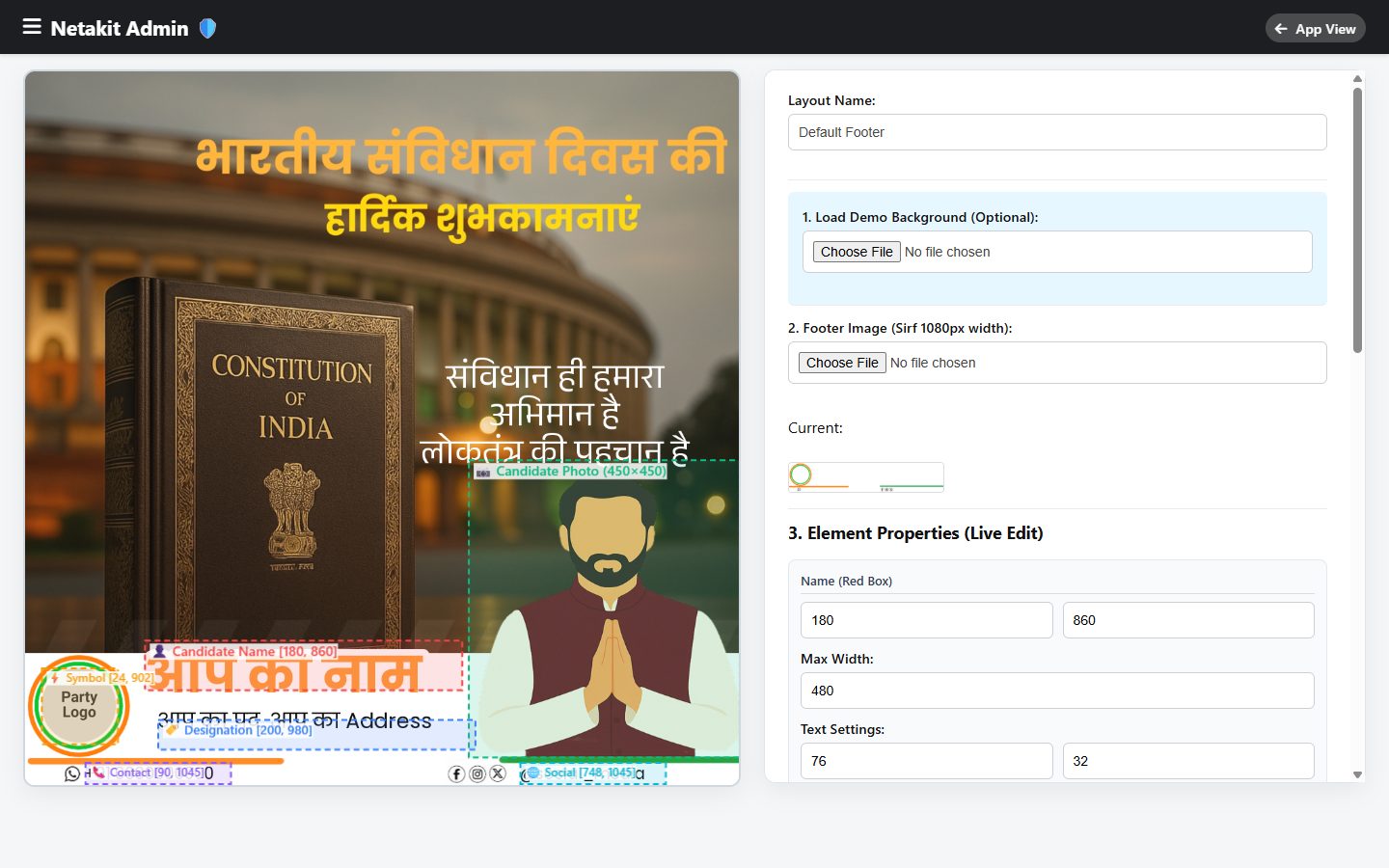
The visual layout editor uses an HTML5 canvas to configure regions for profile portraits, names, designations, organization/party symbols, and contact details. Positioning and typography settings are stored as layout configuration so different poster designs can reuse the same personalization engine.

Netakit Admin — Layout Editor
Netakit Admin Layout Editor showing interactive HTML5 canvas with draggable coordinate bounding boxes for profile photo, name, designation, and symbol placement

Internal Layout Editor: visual controls for profile-photo regions, symbols, typography placement, and footer elements used by the personalization engine.

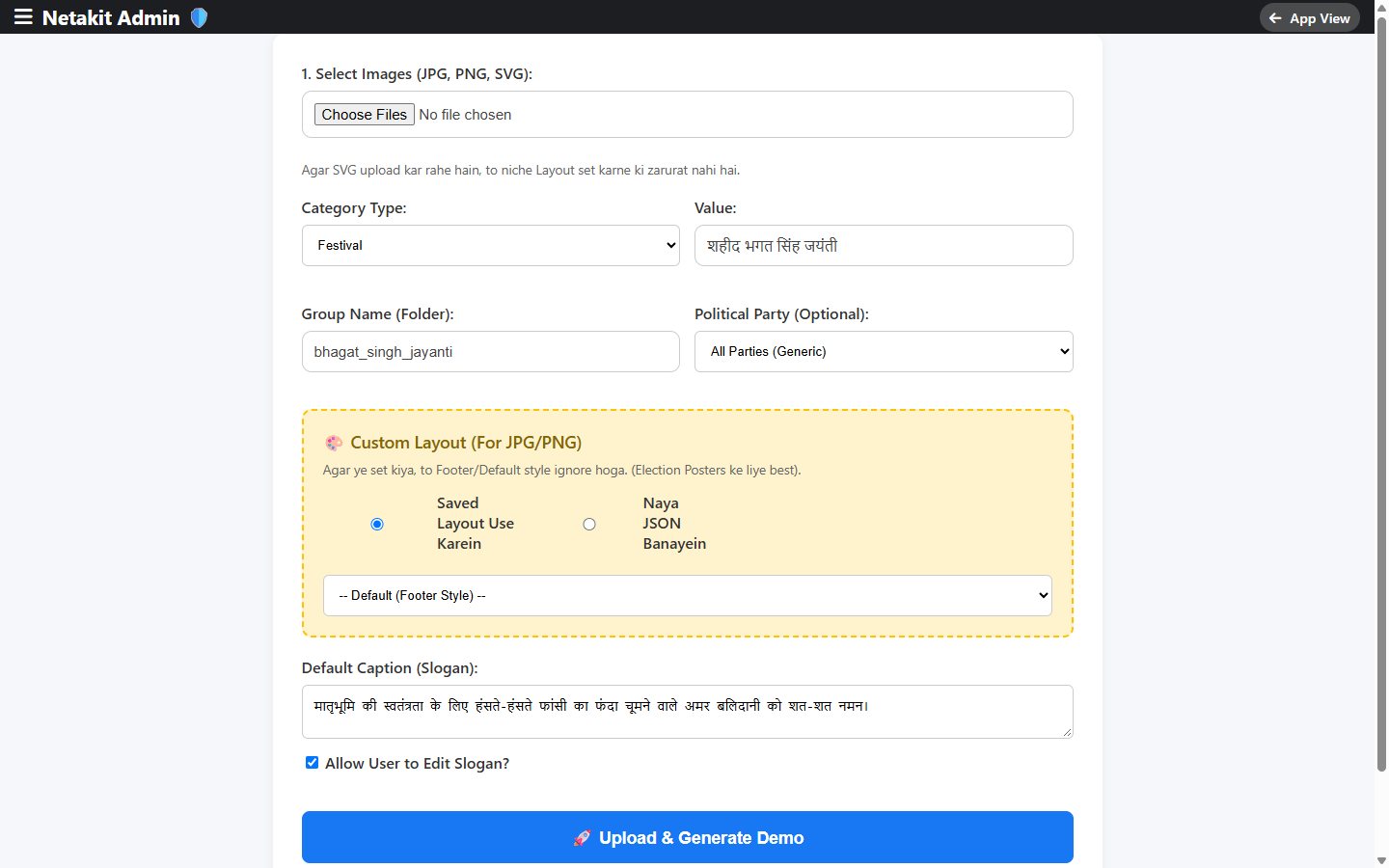
The Content Studio handles routine template ingestion. Admin users can upload artwork, assign categories and event dates, apply party filters where relevant, configure default Hindi captions, select saved layouts, and generate demo previews.

Netakit Admin — Content Studio
Netakit Admin Studio upload screen showing multi-file template ingestion, category binding, political party dropdown, and default slogan configuration

Admin Content Studio: template upload and configuration for event dates, categories, optional party filters, captions, and saved layouts.

Commercial and product infrastructure

Netakit incorporates essential SaaS business infrastructure alongside its core personalization engine:

  • Tiered plan rules: Free and paid plans use different generation limits, template access, and watermark settings.
  • Razorpay integration: The server creates Razorpay checkout orders, verifies payment signatures, and processes payment webhooks to update subscriptions.
  • Watermark and export rules: Rendering rules apply the configured watermark policy and produce 1080×1080 PNG exports.
  • Promo and referral workflow: Promo codes, referral discounts and commissions, wallet balances, and withdrawal requests are supported by the product backend.
  • AI Slogan Studio: Optional Hindi slogan assistance is available as a secondary feature, with a local fallback dataset when the external model is unavailable.

How the data moves

A high-level view of how user profiles, event calendar metadata, and template configurations flow through the personalization pipeline to deliver high-resolution social assets.

01

Responsive Web App

Mobile-first interface, calendar strip, and slogan customization

02

Flask Application

Authentication, session state, and dynamic event grouping

03

Profile & Plan Rules

Profile identity metadata, tier gating, and watermark rules

04

Redis / RQ Queue

Decoupled asynchronous worker queue for background rendering

05

Pillow Engine

1080×1080 compositing, text box scaling, and asset layering

06

Media Delivery

Nginx static delivery, WebP feed thumbnails, and PNG downloads

Relational Store

PostgreSQL Database

Stores profiles, subscriptions, event-calendar records, template metadata, captions, and plan permissions

Internal Tooling

Layout & Content Studio

HTML5 canvas layout editor and multi-asset content studio for routine layout and template management

Payments

Razorpay Gateway

Checkout order creation, signature verification, and webhook-driven subscription updates

Performance

WebP Asset Pipeline

Creates lightweight feed thumbnails while preserving full-resolution PNG output for downloads

My role and workflow

I took Netakit from initial concept to a live product as a Software Developer & Product Builder.

My role covered product requirements, workflow design, architecture decisions, AI-assisted implementation and debugging, testing, deployment, and ongoing operation. I tested the system with synthetic profiles to catch typography and layout issues, shaped the internal admin tooling, and managed the production system after launch.

Technical snapshot

Role
Software Developer & Product Builder
Core Stack
Python, Flask, Jinja2, PostgreSQL, Redis, RQ, Pillow, Flask-Login, Razorpay, HTML5 Canvas, Nginx
Capabilities
Devanagari & Latin typography handling, asynchronous poster rendering, 1080×1080 PNG export, WebP feed thumbnails, calendar-driven discovery, admin layout/content tooling, and subscription rules
Status
Live (deployed and operated in production).

Technical Architecture Note

For an architectural review of deterministic template anchoring, font metrics, and background Redis worker queues for 1080×1080 graphics, read the companion build note: Asynchronous Image Rendering for Graphic Personalization →

Interested in automated personalization or content tools?

Tell me what you need, your timeline, and what is already in place. Smaller scoped work is welcome too.